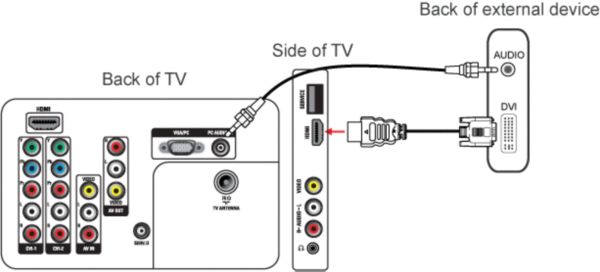
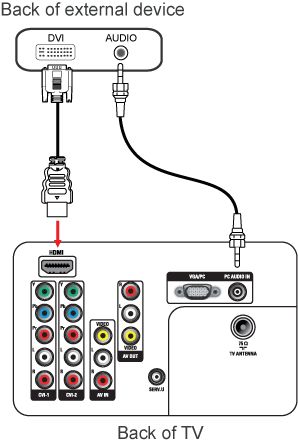
When you make a DVI-HDMI connection you have to make a separate audio connection, since DVI does not support audio.
There are two ways to connect a DVI device to your TV:
- Side DVI-HDMI connection
- Rear DVI-HDMI connection
Follow these steps to connect the devices:
- Switch the external device and the TV off.
- Connect the devices choosing one of the above solutions.
- Connect the DVI-to-HDMI adapter from the ‘DVI’connection of the external device to the ‘HDMI’ connection at the side or rear of the TV.
- Connect the audio cable from the ‘AUDIO OUT' connection of the external device to the ‘PC AUDIO IN’ connection at the rear of the TV.
- Switch the external device and the TV on.
- Press the [Source] button on the remote control repeatedly to select the HDMI input to which the external device is connected and press the [OK] button to accept.